

Introduction
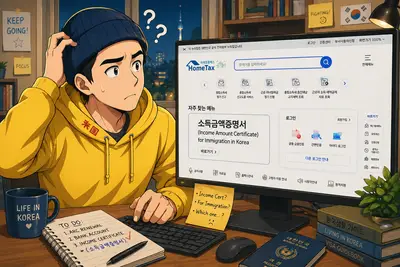
If you are extending a visa in Korea, immigration often asks for proof that you have reported income in Korea (and sometimes that you are up to date with taxes). The most common document for this is the 소득금액증명서 (Income Amount Certificate) — an official National Tax Service (국세청) certificate that summarizes your income amount for a specific year.
This is important because it quickly shows immigration that you have had legitimate income activity in Korea and helps support your visa extension application when financial requirements apply.
When it becomes available: If you filed taxes for the previous year, the 소득금액증명서 is typically issued starting May 1 at 12:00 AM each year.
If your visa expires before the newest certificate is available: submit the certificate from 2 years prior when last year’s certificate is not available yet. If you haven’t lived in Korea long enough to have a 2-years-prior certificate, tell immigration: “The personal income certificate for last year is not available yet.” Immigration already knows the issuance timing is usually May 1.
What is the 소득금액증명서?
- An official National Tax Service (국세청) certificate showing your reported income amount for a given year.
- Frequently used for immigration submissions (visa extension/status change), plus banks, loans, scholarships, etc.
What you need
- ARC (Alien Registration Card) or passport
- A login method for HomeTax (recommended):
- 간편인증 (PASS, Kakao, Naver, etc.) or
- 공동인증서 (certificate)
Option 1 (Recommended): Issue it online via HomeTax
- Go to HomeTax: https://www.hometax.go.kr
- If the site loads in Korean, that’s normal — you can still navigate using the menu labels below.
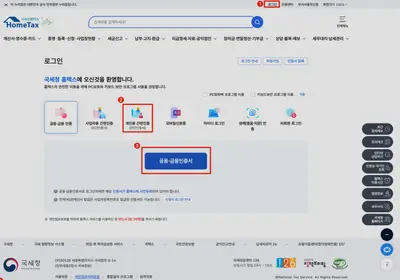
- Click 로그인 (Log in).
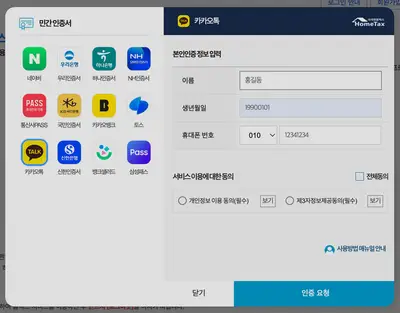
- Choose 간편인증 (simple verification) if you have PASS/Kakao/Naver, or use 공동·금융인증서 if you have a certificate.
- Complete the authentication steps and return to HomeTax.
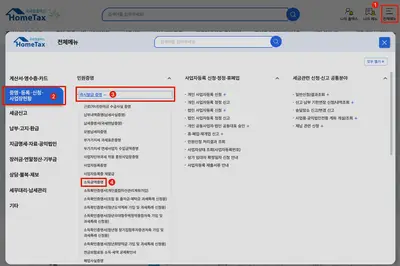
- From the top menu, click 전체메뉴 → 증명-등록-신청-사업장현황 → 즉시발급 증명 → 소득금액증명
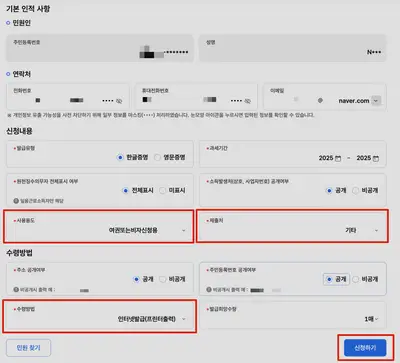
- Fill in the application screen:
- 과세기간/연도 (Year): select the year immigration requested.
- 제출처/용도 (Purpose/Submission): choose 출입국 / 출입국 제출용 if the option exists.
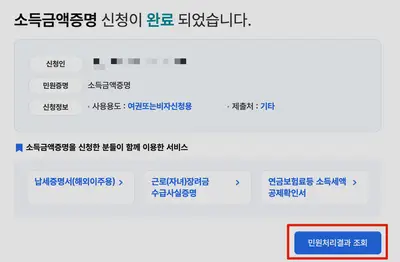
- Submit, then choose how to receive it:
- 출력 (Print) to print immediately
- PDF 저장 / 다운로드 (wording varies) to save a PDF
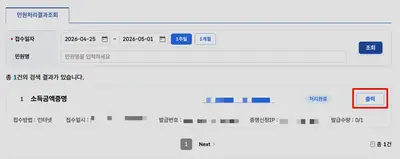
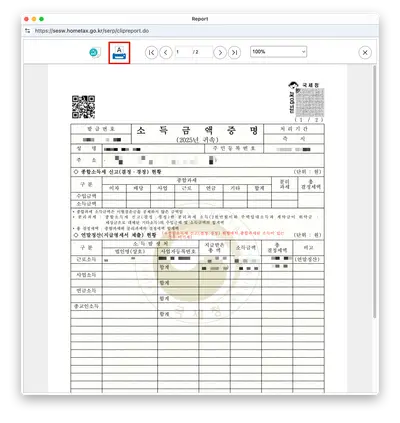
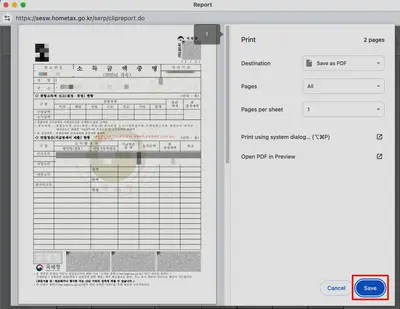
- Double-check the document:
- Your name
- The year (과세기간)
- The income amount
Tip: If you are submitting online, a clear PDF is usually easiest to attach. If you are submitting in person, printing it is fine.
If you cannot issue it yet, the latest year may not be processed. Try again after May 1 at 12:00 AM.
Option 2: Issue it online via GOV.KR (정부24 / Gov24)
Gov24 can also issue many official certificates. The exact menu labels can change, but the overall flow is consistent.
- Go to Gov24: https://www.gov.kr
- Click 로그인 and sign in (간편인증 / 공동인증서).
- Use the search bar and search for:
- 소득금액증명
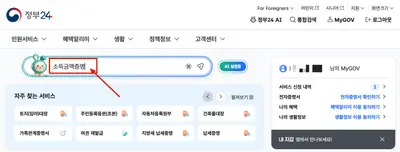
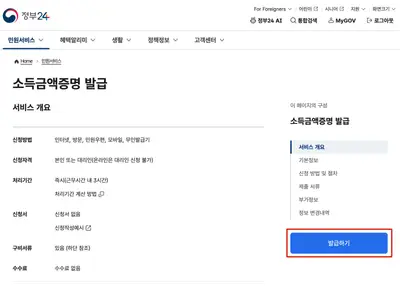
- Open the service that matches 소득금액증명서 발급.
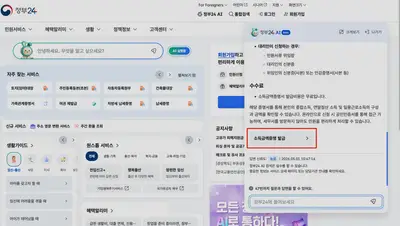
- Click the button for:
- 발급하기 / 신청하기 (Issue / Apply)
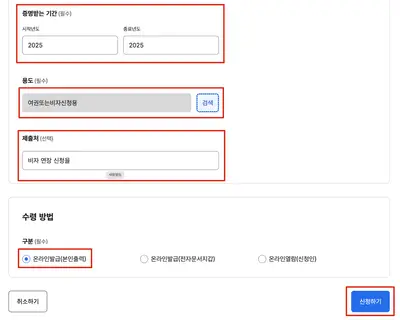
- Fill in the request details:
- Select the year you need.
- If there is a 제출처/용도 field, choose 출입국 when possible.
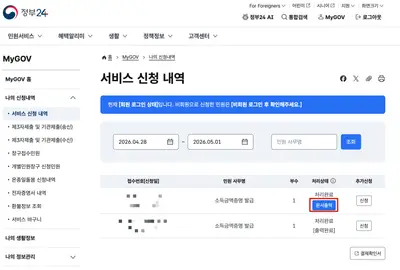
- Submit and then:
- Download the PDF or print it.
If you can’t find the service via search, try searching Gov24 for related terms like 국세청 소득금액증명 or use the HomeTax method above (it is the most direct route).
Option 3: Get it in person at a Tax Office (세무서)
- Visit a 세무서 (tax office) and go to the 민원실.
- Bring your ARC (or passport).
- Say:
- “소득금액증명서 발급 부탁드립니다. 출입국 제출용이에요.”
- Receive the printed certificate.
Immigration tip (often requested together)
Sometimes immigration also wants proof that taxes are fully paid. If asked, issue one of these as well:
- 납세증명서 (Tax Payment Certificate)
- 국세 완납증명서 (Certificate of full payment)
Conclusion
The 소득금액증명서 is one of the most common documents immigration requests to confirm you have officially reported income in Korea. In most cases, the fastest way is to issue it online through HomeTax, with Gov24 and your local tax office as solid backups.
If you are applying around late April, remember that the newest year’s certificate usually becomes available starting May 1 at 12:00 AM, so immigration may accept the certificate from two years prior until the latest one is issued. Before you submit, double-check the year (과세기간) and that the PDF or printout is clear and readable.
🏠 Looking for Housing in Korea? Renting Made Easy!
10% Off Service Fee with code:
KIMNINJA10
Enkostay Benefits:
✅ No Deposit ✅ Online Booking ✅ Immigration-friendly docs ✅ Flexible Contracts
Perfect for:
👨🏻💻 Digital Nomads 🎓 Students ✈️ Long-Term Travelers 🧳 Working Holiday
📬 Weekly Tips in Your Inbox
Whether you’re visiting, staying long-term, or relocating. I share honest insights, guides, and tools to help you navigate life in Korea.
Join 1,000+ readers learning how to live smarter in Korea, from visas to vibes.
👋 About Kim Ninja

Kim Ninja (Nguyen Huy Kim)
🧭 Cultural Guide · ✍️ Storyteller · 🎨 Curator
📢 Creator helping foreigners understand and thrive in Korea
🗺️ I turn everyday challenges into comics, guides, and stories
The blog published by Kim Ninja (Huy-Kim Nguyen) is available for informational purposes only and is not considered legal advice on any subject matter.